
Dev Log · Flashlight Pure, Release, Morse, Privacy
Flashlight Pure 1.2.0: reading Morse, not just sending it, a form instead of emails, and the colours of the icon
15 November 2026:
Flashlight Pure 1.2.0 is finished and on its way to Google Play. Three things are new: the app can receive Morse, it has a support form, and it wears the colours of its icon. Each came with a decision that could have gone another way. Here is why we made it the way we did.
Receiving Morse: the other half
The app has been able to send Morse for a long time. But a light signal is only half the job if nobody on the other side can read Morse. Someone who sees a blinking light and does not know the code by heart just stands there counting.
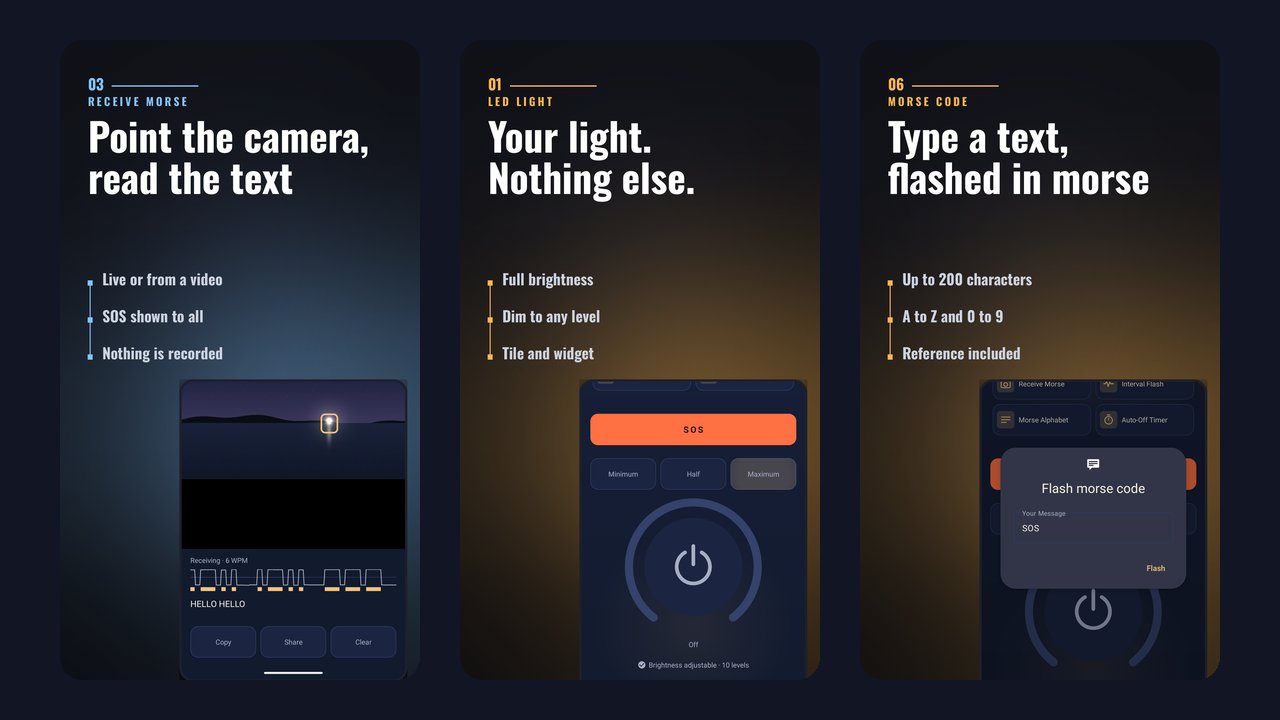
Now you point the camera at the light and keep it inside the frame. The app finds the bright spot, measures how long it is on and off, and shows the text as it comes in. Instead of the camera you can also pick a video from your gallery. There is a practical reason for that: filming a light and having it analysed afterwards is often easier than holding the phone steady on it while it blinks.
We did not reinvent the signal processing. At its core it comes from an open-source project under the MIT licence (dhamma-dev/morse-decoder), which we carried over to Kotlin. The notice is in the app under licences.
Why everyone sees an SOS
Sending Morse is part of Pro, so it was tempting to make reading it Pro as well. With one exception: a recognised SOS is shown to everyone, without a purchase. Sending SOS has always been free, and a distress signal you may only read after paying would be the opposite of that.
Along the way we found a bug that would have hurt exactly here: if you ignore the gap between the words, "IS OSLO" contains the letters S, O, S in a row. The first version reported an SOS there. Now SOS only counts within a single word.
The camera, and only for this
Up to 1.1.0 the app needed no camera permission. On Android the LED can be switched without it. Receiving does not work without it, so we decided how far it goes: Android only asks when you open the receiver. The pictures are analysed in memory, nothing is recorded, stored or sent. In the Play Store the camera is marked as not required, so devices without a camera still find the app.
Until today our website said the app has a single permission and no camera. With 1.2.0 that is no longer true, and we changed it before the version is out.
Where the limit is
A dot has to show on about two camera frames. At 30 frames per second that is enough for roughly 20 words per minute. Faster Morse is not read reliably. In the device tests on Firebase Test Lab a Galaxy S24 delivered 30 frames per second, a Galaxy A05s only 18. On phones like that the limit drops accordingly, and the app shows how many frames per second the camera delivers.
We tested with synthetic videos whose content is known in advance, on our own machine and on real devices running Android 10 to 16.
A form instead of an email with device data
Flashlight Pure grew out of FlashDim, an open-source project. From there it inherited a dialog that asked owners of unsupported devices to send an email with device data. That dialog is gone.
Instead you can now write to us from the app, under Settings, "Send feedback". The rule behind it: the form only sends what it shows first. Topic, message, an email address if you want to give one, plus app version, Android version, device manufacturer and model, the language and whether Pro is active. These details are visible in the form before you tap send. Nothing else goes with it.
Why device data at all? Because the first question back on almost every bug report is: which phone, which Android version. Sending the answer straight away saves a round trip, but only if you can see what goes along.
The message travels encrypted to a small program on the taschenlampe-pur.de server, which passes it on to us as an email and stores none of it. To guard against messages sent automatically in bulk, it keeps an irreversible checksum of the IP address for at most an hour. You do not need a mail app for this. If you prefer email, that still works, the address is in the app.
This means the app now uses its internet permission for two things instead of one: the Pro purchase and the message you send yourself. The privacy policy describes both.
The colours of the icon
The app's icon is night blue and gold. The app itself was not. Now the background is night blue and everything you can operate is gold. Orange is left in exactly one place: the SOS button. Before, orange was also the brand colour. Now the one button that has to be found in an emergency stands out from the rest.
The Pro page has been reordered. At the top, one sentence on what Pro is: a one-time purchase, no subscription, no ads. Below it the features in short lines, then what stays free, the price sits in the button, and "Restore purchase" is no longer hidden.
Devices that cannot dim
The LED brightness can only be controlled from Android 13 on, and only if the LED supports levels. On every other device the dial used to show a 1, which explained little. Now it says "On", and dragging the arc explains why: Android or the LED.
What is still missing
The pictures on taschenlampe-pur.de still show the old look. We will catch up on that.
What came with 1.1.0 and is not repeated in detail here: red is free in the screen light, SOS can always be stopped, and the app no longer crashes when another app is using the camera.
Flashlight Pure is free on Google Play, and there is more about the app at taschenlampe-pur.de.
Warm regards from the workshopDigitale Manufaktur Rudolstadt